Your favourite song suddenly sounds quieter on one side. You raise the volume, reconnect the earphones and even restart the phone, but the sound still feels dull. The problem may not be Bluetooth, battery life or a damaged speaker. A thin layer of earwax could be blocking the tiny speaker mesh.
Earphone meshes are designed to protect delicate internal drivers from dust and moisture. Unfortunately, they also collect earwax, sweat and skin oil during everyday use. Cleaning them at the right time can restore sound clarity, improve hygiene and prevent debris from being pushed deeper into the earphone.
Clean the Mesh When Sound Becomes Uneven
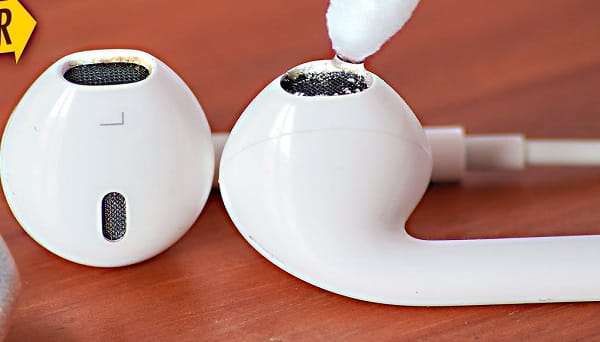
One of the clearest signs is a noticeable difference in volume between the left and right earphones. Before assuming that one speaker has failed, remove the silicone tip and inspect the mesh under bright light.
A blocked mesh may appear darker, shiny or partially covered. The sound may also lack bass or feel distant because the speaker opening cannot move air properly.
Test the earphones on another phone and check the audio balance settings first. When the same side remains quieter on every device, cleaning the mesh is a sensible next step.
Clean After Heavy Workouts or Sweaty Use
Sports earphones collect more moisture and residue than earbuds used only at a desk. Sweat can dry into a salty layer around the mesh, especially when the earphones are placed directly into the charging case after exercise.
Wipe workout earphones after every session. A deeper mesh cleaning may be needed when you notice visible buildup or reduced sound.
Never place wet earbuds in the case. Moisture can affect the speaker, microphones and charging contacts. Allow them to dry completely in a well-ventilated place before charging.
Inspect the Mesh During Regular Tip Cleaning
Removable silicone tips should be cleaned every one or two weeks during normal use. This is also a good time to inspect the speaker mesh.
Frequent cleaning is not always better. Brushing the mesh unnecessarily can damage its protective coating or loosen the material. Clean only when visible debris, reduced sound or heavy sweat exposure makes it necessary.
People who naturally produce more earwax may need to inspect their earphones more often. Sharing earphones should be avoided because it transfers earwax and bacteria between users.
Use a Dry and Gentle Cleaning Method
Switch off the earphones and remove the silicone tips. Hold the earbud so the speaker mesh faces downward. This position allows loosened particles to fall away instead of entering the speaker opening.
Use a clean, dry, soft-bristled brush. A small electronics brush or very soft toothbrush can work when used gently. Brush across the surface without pressing into the mesh.
For loose debris around the edge, use a dry cotton swab. Do not twist the swab aggressively because fibres may become trapped in the mesh.
After cleaning, inspect the opening again and test the sound at a low volume.
Avoid Sharp Objects and Excess Liquid
Pins, needles, toothpicks and metal tools may appear useful for removing stubborn wax, but they can puncture the mesh or damage the speaker underneath.
Do not pour water, sanitiser, perfume or cleaning solution directly onto the earphones. Even water-resistant models are not designed for liquid to be pushed into their sound openings.
Alcohol may damage adhesives, coatings or plastic surfaces on certain products. Use it only when the manufacturer specifically permits it, and never apply it directly to the mesh.
Wax-softening liquids intended for human ears should not be used on electronic devices.
Know When Cleaning Is Not Enough
If one side remains quiet after careful cleaning, the issue may involve moisture damage, a weakened battery, incorrect audio settings or a failing speaker driver.
Crackling, distortion and sound that cuts out when the earbud is moved often point to an internal problem rather than surface dirt. Professional inspection may be worthwhile for premium earphones.
Stop using the device if it becomes hot, develops a chemical smell or shows battery swelling. These are not cleaning problems and require immediate attention.
Replace Damaged Meshes or Ear Tips
The speaker mesh may become loose, torn or pushed inward after repeated cleaning or impact. A damaged mesh allows dirt and moisture to reach the internal driver more easily.
Some earphones use replaceable protective filters, while others require service. Do not continue using an earbud with a missing mesh in dusty or sweaty conditions.
Replace silicone tips when they become stretched, torn or permanently dirty. Properly fitting tips also reduce the amount of wax that reaches the speaker opening.
FAQs
Q: How often should earphone speaker meshes be cleaned?
A: Inspect them every few weeks and clean only when visible buildup, reduced volume or heavy sweat exposure makes it necessary.
Q: Can earwax permanently damage wireless earphones?
A: Yes. Wax can block the mesh, trap moisture and enter internal components if pushed deeper. Early, gentle cleaning reduces the risk.
Q: Why is one earphone still quieter after cleaning?
A: The cause may be a damaged speaker, weak battery, moisture exposure or incorrect audio balance. Test another device before arranging service.
Q: Can I use compressed air on the speaker mesh?
A: It is not recommended. Strong air pressure can push debris deeper or damage the thin mesh and internal speaker components.